

Routing Rules and Policy Routing in RouterOS
Routing Rules and Policy Routing in RouterOS
Section titled “Routing Rules and Policy Routing in RouterOS”Overview
Section titled “Overview”Policy routing (also called policy-based routing or PBR) allows you to make routing decisions based on criteria beyond the destination address. Instead of simply routing all traffic to 8.8.8.8 the same way, you can:
- Route traffic from specific source addresses through different gateways
- Send traffic arriving on certain interfaces through specific uplinks
- Direct packets with specific routing marks to designated routing tables
RouterOS implements policy routing through three components:
- Routing Tables (
/routing/table) - Independent sets of routes - Routing Rules (
/routing/rule) - Select which table to use based on packet attributes - Firewall Mangle (
/ip firewall mangle) - Mark packets for routing decisions
Common use cases:
- Multi-WAN load balancing and failover
- Source-based routing (different departments use different ISPs)
- Traffic steering (send specific protocols through specific paths)
- VRF-like isolation without full VRF implementation
Prerequisites
Section titled “Prerequisites”- RouterOS 7.x or later
- Understanding of basic routing concepts
- Multiple gateways or uplinks (for practical use)
How Policy Routing Works
Section titled “How Policy Routing Works”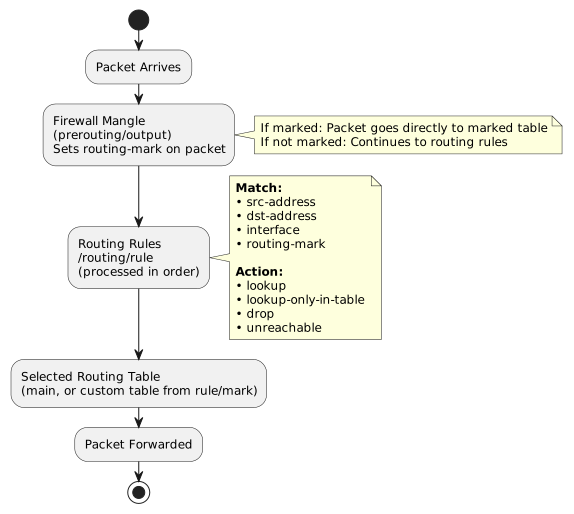
Important: Mangle marks have higher priority than routing rules. If mangle marks a packet and that table can resolve the destination, routing rules are bypassed entirely.
Menu Reference
Section titled “Menu Reference”| Menu | Purpose |
|---|---|
/routing/table | Create and manage routing tables |
/routing/rule | Define policy routing rules |
/ip route | Add routes to tables (IPv4) |
/ipv6 route | Add routes to tables (IPv6) |
/ip firewall mangle | Mark packets for routing |
Configuration Properties
Section titled “Configuration Properties”Routing Table Properties (/routing/table)
Section titled “Routing Table Properties (/routing/table)”| Property | Type | Default | Description |
|---|---|---|---|
name | string | - | Table identifier (required) |
fib | flag | - | Create FIB (forwarding) entry for this table |
comment | string | - | Administrative notes |
Note: The main table always exists and cannot be deleted.
Routing Rule Properties (/routing/rule)
Section titled “Routing Rule Properties (/routing/rule)”| Property | Type | Default | Description |
|---|---|---|---|
action | enum | lookup | What to do with matching packets |
dst-address | IP/prefix | - | Match destination address |
src-address | IP/prefix | - | Match source address |
interface | string | - | Match incoming interface |
routing-mark | string | - | Match packets with this routing mark |
table | string | main | Routing table for lookup actions |
min-prefix | integer | - | Suppress routes with this prefix length or shorter |
disabled | yes/no | no | Enable/disable rule |
comment | string | - | Administrative notes |
Routing Rule Actions
Section titled “Routing Rule Actions”| Action | Description |
|---|---|
lookup | Look up in specified table; fall back to main if not found |
lookup-only-in-table | Look up only in specified table; drop if not found |
drop | Silently discard matching packets |
unreachable | Discard and send ICMP unreachable |
Configuration Examples
Section titled “Configuration Examples”Example 1: Basic Dual-WAN with Source-Based Routing
Section titled “Example 1: Basic Dual-WAN with Source-Based Routing”
Route traffic from different subnets through different ISPs:
# Step 1: Create routing tables/routing/table add name=ISP1 fib/routing/table add name=ISP2 fib
# Step 2: Add default routes to each table/ip route add dst-address=0.0.0.0/0 gateway=192.168.1.1 routing-table=ISP1/ip route add dst-address=0.0.0.0/0 gateway=192.168.2.1 routing-table=ISP2
# Step 3: Create routing rules for source-based routing/routing/rule add src-address=10.0.1.0/24 action=lookup-only-in-table table=ISP1 \    comment="VLAN1 via ISP1"/routing/rule add src-address=10.0.2.0/24 action=lookup-only-in-table table=ISP2 \    comment="VLAN2 via ISP2"
# Step 4: Verify rules/routing/rule print
Example 2: Preserve Local Subnet Routing
Section titled “Example 2: Preserve Local Subnet Routing”Critical: When using policy routing, you must ensure local traffic stays in the main table:
# Add these rules BEFORE ISP-specific rules (order matters!)/routing/rule add dst-address=10.0.0.0/8 action=lookup-only-in-table table=main \    comment="Local RFC1918 - Class A"/routing/rule add dst-address=172.16.0.0/12 action=lookup-only-in-table table=main \    comment="Local RFC1918 - Class B"/routing/rule add dst-address=192.168.0.0/16 action=lookup-only-in-table table=main \    comment="Local RFC1918 - Class C"
# Now add ISP-specific rules/routing/rule add src-address=10.0.1.0/24 action=lookup-only-in-table table=ISP1/routing/rule add src-address=10.0.2.0/24 action=lookup-only-in-table table=ISP2
Example 3: Interface-Based Routing
Section titled “Example 3: Interface-Based Routing”Route traffic based on which interface it arrives on:
# Create table/routing/table add name=guest-table fib
# Add route/ip route add dst-address=0.0.0.0/0 gateway=10.99.99.1 routing-table=guest-table
# Route all traffic from guest interface through guest gateway/routing/rule add interface=ether5-guest action=lookup-only-in-table table=guest-table
Example 4: Using Firewall Mangle for Advanced Matching
Section titled “Example 4: Using Firewall Mangle for Advanced Matching”Route HTTP traffic through a specific gateway:
# Step 1: Create routing table/routing/table add name=http-isp fib
# Step 2: Add route to table/ip route add dst-address=0.0.0.0/0 gateway=192.168.3.1 routing-table=http-isp
# Step 3: Mark HTTP traffic in mangle/ip firewall mangle add chain=prerouting protocol=tcp dst-port=80,443 \    action=mark-routing new-routing-mark=http-mark passthrough=no \    comment="Mark HTTP/HTTPS for routing"
# Step 4: Create routing rule for marked traffic/routing/rule add routing-mark=http-mark action=lookup-only-in-table table=http-isp
Note: Mangle-marked packets bypass other routing rules if the marked table resolves the destination.
Example 5: Multi-WAN with Connection Tracking
Section titled “Example 5: Multi-WAN with Connection Tracking”
Ensure responses go back through the same WAN they came in on:
# Step 1: Create tables/routing/table add name=WAN1 fib/routing/table add name=WAN2 fib
# Step 2: Add routes/ip route add dst-address=0.0.0.0/0 gateway=1.1.1.1 routing-table=WAN1/ip route add dst-address=0.0.0.0/0 gateway=2.2.2.1 routing-table=WAN2
# Step 3: Mark incoming connections/ip firewall mangle add chain=prerouting in-interface=ether1-WAN1 \    connection-state=new action=mark-connection new-connection-mark=WAN1-conn/ip firewall mangle add chain=prerouting in-interface=ether2-WAN2 \    connection-state=new action=mark-connection new-connection-mark=WAN2-conn
# Step 4: Mark routing based on connection mark/ip firewall mangle add chain=prerouting connection-mark=WAN1-conn \    action=mark-routing new-routing-mark=WAN1-route passthrough=no/ip firewall mangle add chain=prerouting connection-mark=WAN2-conn \    action=mark-routing new-routing-mark=WAN2-route passthrough=no
# Step 5: Also mark output chain for locally originated responses/ip firewall mangle add chain=output connection-mark=WAN1-conn \    action=mark-routing new-routing-mark=WAN1-route passthrough=no/ip firewall mangle add chain=output connection-mark=WAN2-conn \    action=mark-routing new-routing-mark=WAN2-route passthrough=no
# Step 6: Routing rules for marked traffic/routing/rule add routing-mark=WAN1-route action=lookup-only-in-table table=WAN1/routing/rule add routing-mark=WAN2-route action=lookup-only-in-table table=WAN2
Example 6: Drop Traffic to Specific Destination
Section titled “Example 6: Drop Traffic to Specific Destination”Block routing to a specific network:
/routing/rule add dst-address=192.168.1.0/24 interface=ether4 action=drop \ comment="Block ether4 from reaching 192.168.1.0/24"Example 7: Suppress Default Route (min-prefix)
Section titled “Example 7: Suppress Default Route (min-prefix)”Use min-prefix to ignore default route and use only more specific routes:
# Only use routes more specific than /0 (ignore default route)/routing/rule add src-address=10.0.5.0/24 action=lookup table=custom-table min-prefix=1This is similar to Linux’s suppress_prefixlength option.
Example 8: IPv6 Policy Routing
Section titled “Example 8: IPv6 Policy Routing”Routing rules also work with IPv6:
# Create IPv6 routing table/routing/table add name=ipv6-alt fib
# Add IPv6 route/ipv6 route add dst-address=::/0 gateway=2001:db8::1 routing-table=ipv6-alt
# Create routing rule for IPv6/routing/rule add src-address=2001:db8:1::/48 action=lookup-only-in-table table=ipv6-alt
Understanding lookup vs lookup-only-in-table
Section titled “Understanding lookup vs lookup-only-in-table”
| Action | If route found | If route NOT found |
|---|---|---|
lookup | Use found route | Fall back to main table |
lookup-only-in-table | Use found route | Drop packet (no fallback) |
Recommendation: Use lookup-only-in-table for strict policy routing where you don’t want fallback behavior.
Rule Processing Order
Section titled “Rule Processing Order”
Rules are processed top-to-bottom. First matching rule wins.
# View current order/routing/rule print
# Move rule to different position/routing/rule move [find comment="Local RFC1918"] destination=0
Best practice order:
- Local/private subnet rules (keep local traffic in main table)
- Specific host or service rules
- Subnet/VLAN rules
- Default/catch-all rules
Common Problems and Solutions
Section titled “Common Problems and Solutions”Problem 1: Local Traffic Breaks After Adding Policy Routes
Section titled “Problem 1: Local Traffic Breaks After Adding Policy Routes”Symptom: Devices on different VLANs can’t communicate with each other.
Cause: Policy rules send local traffic through WAN tables that don’t have routes to local subnets.
Solution: Add rules for RFC1918 addresses before other rules:
/routing/rule add dst-address=10.0.0.0/8 action=lookup-only-in-table table=main/routing/rule add dst-address=172.16.0.0/12 action=lookup-only-in-table table=main/routing/rule add dst-address=192.168.0.0/16 action=lookup-only-in-table table=mainProblem 2: Custom Table Cannot Resolve Destinations
Section titled “Problem 2: Custom Table Cannot Resolve Destinations”Symptom: Traffic matched by rule gets dropped; route exists in custom table.
Cause: Custom table has route to gateway, but gateway is not reachable from that table.
Solution: Ensure custom table can reach the gateway:
# Option 1: Add connected route to custom table/ip route add dst-address=192.168.1.0/24 gateway=ether1 routing-table=custom-table
# Option 2: Reference main table for gateway resolution/ip route add dst-address=0.0.0.0/0 gateway=192.168.1.1@main routing-table=custom-table
Problem 3: Mangle Marks Not Working
Section titled “Problem 3: Mangle Marks Not Working”Symptom: Mangle rules exist but traffic ignores them.
Cause: Wrong chain (must use prerouting for forwarded traffic, output for local traffic).
Solution:
# For forwarded traffic/ip firewall mangle add chain=prerouting ...
# For locally-originated traffic/ip firewall mangle add chain=output ...
Problem 4: Rules Have No Effect
Section titled “Problem 4: Rules Have No Effect”Symptom: Routing rules configured but traffic uses main table.
Causes:
- Mangle mark is bypassing rules
- Rules in wrong order
- Table doesn’t exist or has no routes
Solution:
# Check if mangle is marking traffic/ip firewall mangle print stats
# Check rule order/routing/rule print
# Verify table has routes/ip route print where routing-table=custom-table
Problem 5: Asymmetric Routing on Multi-WAN
Section titled “Problem 5: Asymmetric Routing on Multi-WAN”Symptom: Connections work sometimes; responses go out wrong interface.
Cause: No connection tracking to ensure responses use same path.
Solution: Use connection marks (see Example 5 above).
Verification Commands
Section titled “Verification Commands”# View all routing tables/routing/table print
# View all routing rules/routing/rule print
# View rules with details/routing/rule print detail
# Check routes in specific table/ip route print where routing-table=ISP1
# View mangle rules and hit counts/ip firewall mangle print stats where action=mark-routing
# Test which table a packet would use# (Use /tool/packet-sniffer or torch to trace)/tool/torch interface=ether1 src-address=10.0.1.100
# Check active connections and their marks/ip firewall connection print where connection-mark!=""Limitations
Section titled “Limitations”- Maximum 4,096 routing tables
- Routing rules only match: src-address, dst-address, interface, routing-mark
- For more complex matching (ports, protocols), use firewall mangle
- IPv4 and IPv6 rules are processed together (both in
/routing/rule)
Migration from RouterOS 6.x
Section titled “Migration from RouterOS 6.x”In RouterOS 6.x, routing rules were under /ip route rule. Key differences:
| Aspect | v6 | v7 |
|---|---|---|
| Menu | /ip route rule | /routing/rule |
| Table creation | Automatic | Must create in /routing/table first |
| IPv6 rules | /ipv6 route rule | Unified in /routing/rule |
| VRF | Separate feature | Integrated with routing tables |
Migration example:
# v6 syntax/ip route rule add src-address=10.0.1.0/24 table=isp1
# v7 syntax/routing/table add name=isp1 fib/routing/rule add src-address=10.0.1.0/24 action=lookup-only-in-table table=isp1
Related Features
Section titled “Related Features”- Static Routes (
/ip route) - Define routes within tables - Firewall Mangle (
/ip firewall mangle) - Mark packets for routing - VRF - Full virtual routing and forwarding isolation
- ECMP - Load balance across multiple gateways
- Recursive Routing - Gateway resolution through other routes
- Netwatch - Trigger scripts on gateway failure for failover
Summary
Section titled “Summary”Routing rules enable policy-based routing by selecting which routing table processes a packet:
- Create routing tables in
/routing/tablewithfibflag - Add routes to custom tables via
/ip route ... routing-table= - Create rules in
/routing/ruleto match traffic - Preserve local routing by adding RFC1918 rules first
- Use mangle for advanced matching (ports, protocols)
Key points:
- Rules process top-to-bottom; first match wins
- Mangle marks have priority over rules
lookup-only-in-tableprevents fallback to main table- Custom tables must be able to resolve their gateways
- Always test connectivity between local subnets after changes
Related Topics
Section titled “Related Topics”Prerequisites
Section titled “Prerequisites”- Static Routes - define routes within tables
- Firewall Mangle - mark packets for routing decisions
Multi-WAN and Failover
Section titled “Multi-WAN and Failover”Related Routing
Section titled “Related Routing”- Routing Filters - filter routes from dynamic protocols
- BGP Basic Peering - multi-homing with BGP
- OSPF Configuration - dynamic routing
Related Topics
Section titled “Related Topics”- NAT Masquerade - source NAT for multi-WAN
- IP Address Configuration - interface addressing