

Diagram Tool Comparison
Diagram Tool Comparison
Section titled “Diagram Tool Comparison”This page compares 5 different diagramming tools across 4 diagram types commonly used in our documentation.
Tools Evaluated:
| Tool | Type | Build Step | Notes |
|---|---|---|---|
| D2 | Text → SVG | Yes (CLI) | Beautiful defaults, modern |
| D2 Sketch | Text → SVG | Yes (CLI) | Hand-drawn aesthetic |
| Mermaid | Markdown | No | Already integrated |
| Hand-crafted SVG | XML | No | Full design control |
| PlantUML | Text → Image | Yes (Kroki API) | Mature, UML-focused |
1. Network Topology (BGP AS Diagram)
Section titled “1. Network Topology (BGP AS Diagram)”Multi-AS topology showing eBGP/iBGP relationships between routers.
Original ASCII
Section titled “Original ASCII”┌─────────────────────────────────────────────────────────────┐│ AS 65001 ││ ┌─────────────┐ ┌─────────────┐ ┌─────────────┐ ││ │ Router A │────│ Router B │────│ Router C │ ││ └─────────────┘ └─────────────┘ └─────────────┘ │└─────────┼────────────────────────────────────────┼─────────┘ │ eBGP eBGP │┌─────────┼─────────┐ ┌─────────┼─────────┐│ AS 65002 │ │ AS 65003 ││ ┌─────────────┐ │ │ ┌─────────────┐ ││ │ Router D │ │ │ │ Router E │ │└───────────────────┘ └───────────────────┘D2 (Clean)
Section titled “D2 (Clean)”
D2 (Sketch Mode)
Section titled “D2 (Sketch Mode)”
Hand-crafted SVG
Section titled “Hand-crafted SVG”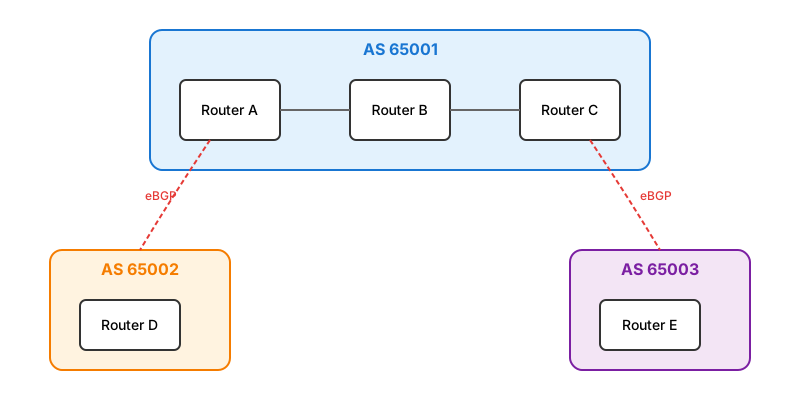
Mermaid
Section titled “Mermaid”flowchart TB
subgraph AS65001["AS 65001"]
direction LR
A[Router A] --- B[Router B] --- C[Router C]
end
subgraph AS65002["AS 65002"]
D[Router D]
end
subgraph AS65003["AS 65003"]
E[Router E]
end
A -.->|eBGP| D
C -.->|eBGP| E
style AS65001 fill:#e3f2fd,stroke:#1976d2
style AS65002 fill:#fff3e0,stroke:#f57c00
style AS65003 fill:#f3e5f5,stroke:#7b1fa2
PlantUML (via Kroki)
Section titled “PlantUML (via Kroki)”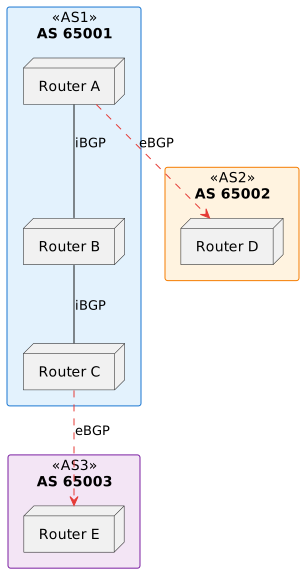
2. High Availability (VRRP Topology)
Section titled “2. High Availability (VRRP Topology)”Router redundancy with Master/Backup and Virtual IP failover.
Original ASCII
Section titled “Original ASCII”┌─────────┐ ┌─────────┐ ┌─────────┐│ PC1 │ │ PC2 │ │ PC3 │└────┬────┘ └────┬────┘ └────┬────┘ └──────────────┼──────────────┘ ┌─────┴─────┐ │ Switch │ └─────┬─────┘ ┌──────────┼──────────┐ ┌─────┴─────┐ ┌─────┴─────┐ │ Router A │ │ Router B │ │ MASTER │ │ BACKUP │ └───────────┘ └───────────┘ └────── VIP: 10.0.10.1 ──────┘D2 (Clean)
Section titled “D2 (Clean)”
D2 (Sketch Mode)
Section titled “D2 (Sketch Mode)”
Hand-crafted SVG
Section titled “Hand-crafted SVG”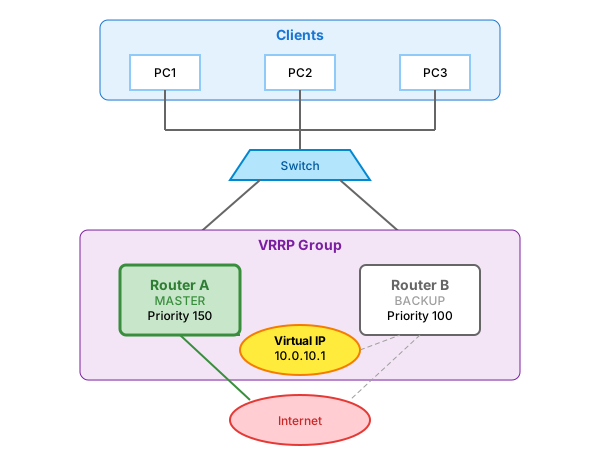
Mermaid
Section titled “Mermaid”flowchart TD
subgraph clients["Clients"]
PC1["PC1<br/>.10.100"]
PC2["PC2<br/>.10.101"]
PC3["PC3<br/>.10.102"]
end
SW[Switch]
subgraph vrrp["VRRP Group"]
VIP(("Virtual IP<br/>10.0.10.1"))
RA["Router A<br/>MASTER<br/>Priority 150"]
RB["Router B<br/>BACKUP<br/>Priority 100"]
end
Internet((Internet))
PC1 & PC2 & PC3 --> SW
SW --> RA & RB
RA -.->|owns| VIP
RB -.->|standby| VIP
RA & RB --> Internet
style RA fill:#c8e6c9,stroke:#388e3c,stroke-width:3px
style RB fill:#fff,stroke:#9e9e9e
style VIP fill:#ffeb3b,stroke:#f57c00
PlantUML (via Kroki)
Section titled “PlantUML (via Kroki)”
3. Sequence Diagram (OSPF Exchange)
Section titled “3. Sequence Diagram (OSPF Exchange)”Protocol message exchange showing neighbor establishment phases.
Original ASCII
Section titled “Original ASCII”Router A Router B │ │ │ 1. Hello (multicast 224.0.0.5) │ ├──────────────────────────────────────→│ │ 2. Hello (with A's Router-ID) │ │←──────────────────────────────────────┤ │ 3. Database Description (DD) │ ├──────────────────────────────────────→│ │ 4. Link State Request (LSR) │ ├──────────────────────────────────────→│
D2 (Sketch Mode)
Section titled “D2 (Sketch Mode)”
Hand-crafted SVG
Section titled “Hand-crafted SVG”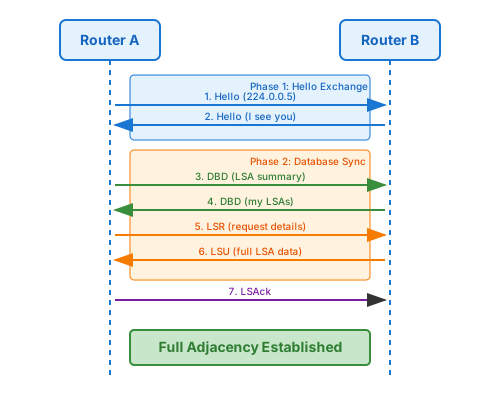
Mermaid
Section titled “Mermaid”sequenceDiagram
participant A as Router A<br/>10.0.0.1
participant B as Router B<br/>10.0.0.2
rect rgb(227, 242, 253)
Note over A,B: Phase 1: Hello Exchange
A->>B: Hello (224.0.0.5)
B->>A: Hello (I see you)
end
rect rgb(255, 243, 224)
Note over A,B: Phase 2: Database Sync
A->>B: DBD (LSA summary)
B->>A: DBD (my LSAs)
A->>B: LSR (request details)
B->>A: LSU (full LSA data)
A->>B: LSAck
end
Note over A,B: Full Adjacency Established
PlantUML (via Kroki)
Section titled “PlantUML (via Kroki)”
4. Flowchart (Firewall Packet Flow)
Section titled “4. Flowchart (Firewall Packet Flow)”Packet processing pipeline through RouterOS filter chains.
Original ASCII
Section titled “Original ASCII” Packet Arrives │ ▼┌──────────────┐ ┌─────────────┐ ┌──────────────┐ ┌─────────────┐│ PREROUTING │───▶│ ROUTING │───▶│ FILTER │───▶│ POSTROUTING ││ (Raw/Mangle)│ │ DECISION │ │ CHAINS │ │ (Mangle/NAT)│└──────────────┘ └─────────────┘ └──────────────┘ └─────────────┘
D2 (Sketch Mode)
Section titled “D2 (Sketch Mode)”
Hand-crafted SVG
Section titled “Hand-crafted SVG”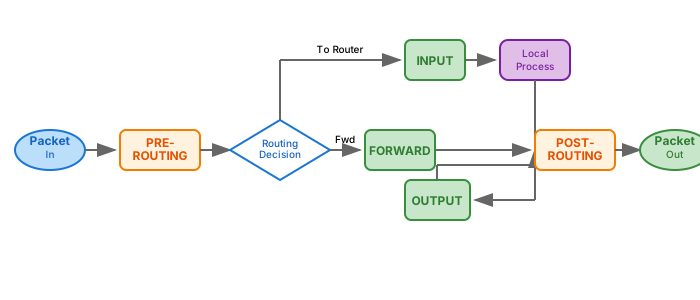
Mermaid
Section titled “Mermaid”flowchart LR
A([Packet In]) --> B[PREROUTING]
B --> C{Routing<br/>Decision}
C -->|To Router| D[INPUT]
C -->|Forward| E[FORWARD]
D --> F[(Local<br/>Process)]
F --> G[OUTPUT]
E --> H[POSTROUTING]
G --> H
H --> I([Packet Out])
style A fill:#bbdefb
style I fill:#c8e6c9
style B fill:#fff3e0,stroke:#f57c00
style H fill:#fff3e0,stroke:#f57c00
style D fill:#c8e6c9,stroke:#388e3c
style E fill:#c8e6c9,stroke:#388e3c
style G fill:#c8e6c9,stroke:#388e3c
PlantUML (via Kroki)
Section titled “PlantUML (via Kroki)”
Summary Comparison
Section titled “Summary Comparison”By Diagram Type
Section titled “By Diagram Type”| Diagram Type | Best Tool | Runner-up | Notes |
|---|---|---|---|
| Network Topology | D2 | Hand-crafted SVG | D2 handles grouping well |
| VRRP/HA | D2 Sketch | Hand-crafted SVG | Sketch mode adds personality |
| Sequence | Mermaid | D2 | Mermaid’s sweet spot |
| Flowchart | D2 | Mermaid | D2 has better shapes |
By Tool
Section titled “By Tool”| Tool | Pros | Cons | Best For |
|---|---|---|---|
| D2 | Beautiful, simple syntax, themes | Requires build step | Network diagrams, flowcharts |
| D2 Sketch | Unique look, same syntax | Large file sizes | Informal docs, standout diagrams |
| Mermaid | No build, inline markdown | Limited styling | Sequence diagrams, quick diagrams |
| Hand-crafted SVG | Pixel-perfect control | Time-consuming, hard to maintain | Hero diagrams, branding |
| PlantUML | Mature, many diagram types | Verbose syntax, external API | UML, complex sequences |
My Recommendation
Section titled “My Recommendation”Use D2 as the primary tool with these guidelines:
- D2 (Clean) - Default for all network topology and flowchart diagrams
- D2 Sketch - For conceptual diagrams where hand-drawn feel adds value
- Mermaid - Keep for simple sequence diagrams (no build step needed)
- Hand-crafted SVG - Reserve for landing page / hero graphics only
Workflow
Section titled “Workflow”# Edit D2 source files in /diagrams/*.d2# Render to SVG:d2 diagram.d2 diagram.svg # Cleand2 --sketch diagram.d2 diagram.svg # Hand-drawnd2 --theme 1 diagram.d2 diagram.svg # Dark themePick your favorite and let me know!