

IPsec IKEv2 Site-to-Site VPN: Complete Implementation Guide
IPsec IKEv2 Site-to-Site VPN: Complete Implementation Guide
Section titled “IPsec IKEv2 Site-to-Site VPN: Complete Implementation Guide”RouterOS Version: 7.x+ Difficulty: Advanced Estimated Time: 60 minutes
TL;DR (Quick Start)
Section titled “TL;DR (Quick Start)”For the impatient: here’s the 30-second version.
# Site A (initiator): 203.0.1.1, LAN 10.1.0.0/24/ip ipsec peer add address=203.0.2.1/32 exchange-mode=ike2 name=site-b/ip ipsec identity add peer=site-b secret=YourSecretKey123 auth-method=pre-shared-key/ip ipsec policy add src-address=10.1.0.0/24 dst-address=10.2.0.0/24 tunnel=yes peer=site-b
# Site B (responder): 203.0.2.1, LAN 10.2.0.0/24/ip ipsec peer add address=203.0.1.1/32 exchange-mode=ike2 name=site-a passive=yes/ip ipsec identity add peer=site-a secret=YourSecretKey123 auth-method=pre-shared-key/ip ipsec policy add src-address=10.2.0.0/24 dst-address=10.1.0.0/24 tunnel=yes peer=site-a
Overview
Section titled “Overview”IPsec IKEv2 site-to-site VPNs create secure, encrypted tunnels between geographically separated networks over the public internet. Unlike legacy protocols, IKEv2 provides superior reliability, faster reconnection after network interruptions, and stronger cryptographic algorithms that meet modern security requirements.
This guide explains the fundamental concepts, implementation strategies, and critical configuration decisions that determine whether your VPN performs reliably or becomes a source of constant troubleshooting.
Understanding IPsec IKEv2 Architecture
Section titled “Understanding IPsec IKEv2 Architecture”The Two-Phase Protocol
Section titled “The Two-Phase Protocol”IKEv2 operates in two distinct phases, each serving a specific purpose:

Phase 1 (IKE_SA): Establishes the secure control channel
- Authenticates both peers (PSK, certificates, or EAP)
- Negotiates encryption algorithms and Diffie-Hellman groups
- Creates the foundation for all subsequent communication
- Lives for hours/days (long-lived)
Phase 2 (CHILD_SA): Creates the actual data tunnels
- Negotiates ESP encryption parameters
- Establishes traffic selectors (which networks to encrypt)
- Can create multiple tunnels per IKE_SA
- Automatically rekeyed every 30 minutes (short-lived)
Tunnel vs Transport Mode
Section titled “Tunnel vs Transport Mode”IPsec can operate in two modes, but site-to-site VPNs always use tunnel mode:
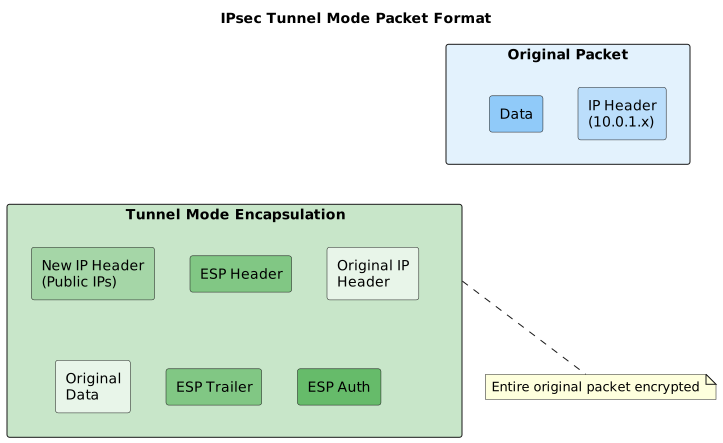
Why tunnel mode: Allows routing between different networks by encapsulating the entire original packet within a new IP header using the public gateway addresses.
Network Address Translation (NAT) Considerations
Section titled “Network Address Translation (NAT) Considerations”NAT fundamentally conflicts with IPsec because:
- ESP packets can’t be NATed - they’re encrypted end-to-end
- IKE packets contain IP addresses - NAT breaks the cryptographic integrity
- Multiple clients behind NAT - can’t distinguish between connections
NAT Traversal (NAT-T) solves this by:
- Detecting NAT devices during negotiation
- Encapsulating ESP packets in UDP port 4500
- Using special keepalive packets to maintain NAT mappings

Authentication Methods Comparison
Section titled “Authentication Methods Comparison”Pre-Shared Keys (PSK)
Section titled “Pre-Shared Keys (PSK)”Pros: Simple to configure, no certificate infrastructure needed Cons: Vulnerable to offline attacks, doesn’t scale, shared secret management
/ip ipsec identityadd peer=site-b secret=VeryLongRandomStringThatIsHardToGuess123!Security note: PSK is vulnerable to offline dictionary attacks in all exchange modes. Use certificates for production deployments.
Digital Certificates (Recommended)
Section titled “Digital Certificates (Recommended)”Pros: Strong authentication, scalable, supports certificate revocation Cons: Requires PKI setup, more complex initial configuration
/ip ipsec identityadd auth-method=digital-signature certificate=site-a-cert peer=site-bBest practice: Use certificates with proper CN/SAN fields and maintain a certificate authority for revocation capabilities.
Site-to-Site Topology Patterns
Section titled “Site-to-Site Topology Patterns”Hub-and-Spoke
Section titled “Hub-and-Spoke”One central site connects to multiple branch offices:

Configuration strategy: Hub uses passive mode, branches initiate connections
Mesh (Full Connectivity)
Section titled “Mesh (Full Connectivity)”Every site connects directly to every other site:

Configuration strategy: Each site needs peers for all other sites
Redundant Paths
Section titled “Redundant Paths”Multiple connections between critical sites:
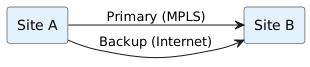
Configuration strategy: Use routing protocols (OSPF/BGP) over IPsec tunnels
Configuration Steps
Section titled “Configuration Steps”
This section provides a minimal testable configuration for establishing an IKEv2 site-to-site tunnel between two MikroTik routers.
Step 1: Configure Site A (Initiator)
Section titled “Step 1: Configure Site A (Initiator)”Create the peer configuration pointing to Site B’s public IP:
/ip ipsec peer add address=203.0.2.1/32 exchange-mode=ike2 name=site-bStep 2: Configure Site A Identity
Section titled “Step 2: Configure Site A Identity”Set up authentication using a pre-shared key:
/ip ipsec identity add peer=site-b secret=TestSecret123 auth-method=pre-shared-keyStep 3: Configure Site A Policy
Section titled “Step 3: Configure Site A Policy”Define which networks should be encrypted (10.1.0.0/24 to 10.2.0.0/24):
/ip ipsec policy add src-address=10.1.0.0/24 dst-address=10.2.0.0/24 tunnel=yes peer=site-bStep 4: Configure Site B (Responder)
Section titled “Step 4: Configure Site B (Responder)”Configure Site B to accept connections from Site A:
/ip ipsec peer add address=203.0.1.1/32 exchange-mode=ike2 name=site-a passive=yes/ip ipsec identity add peer=site-a secret=TestSecret123 auth-method=pre-shared-key/ip ipsec policy add src-address=10.2.0.0/24 dst-address=10.1.0.0/24 tunnel=yes peer=site-aVerification
Section titled “Verification”Check that the IKE_SA (Phase 1) is established:
/ip ipsec active-peers printExpected Output:
# REMOTE-ADDRESS STATE UPTIME PH2-TOTAL0 203.0.2.1 established 00:01:23 1Verify the CHILD_SA (Phase 2) and traffic policies:
/ip ipsec policy print detailExpected Output:
0 src-address=10.1.0.0/24 dst-address=10.2.0.0/24 protocol=all action=encrypt level=require ipsec-protocols=esp tunnel=yes sa-src-address=203.0.1.1 sa-dst-address=203.0.2.1 proposal=default ph2-count=1 ph2-state=establishedAdvanced Configuration Concepts
Section titled “Advanced Configuration Concepts”Profiles and Proposals: Controlling Cryptography
Section titled “Profiles and Proposals: Controlling Cryptography”Profiles control Phase 1 (IKE_SA) parameters:
/ip ipsec profileadd name=strong-ike2 dh-group=ecp256,modp2048 enc-algorithm=aes-256,aes-128 hash-algorithm=sha256 lifetime=8hProposals control Phase 2 (CHILD_SA) parameters:
/ip ipsec proposaladd name=strong-esp enc-algorithms=aes-256-gcm,aes-256-cbc auth-algorithms=sha256 pfs-group=ecp256 lifetime=1hWhy separate them: Different security requirements and rekey intervals optimize both security and performance.
Dead Peer Detection (DPD)
Section titled “Dead Peer Detection (DPD)”DPD detects when the remote peer becomes unreachable:
/ip ipsec profileset [find name=strong-ike2] dpd-interval=30s dpd-maximum-failures=3How it works:
- Send DPD probe every 30 seconds during idle periods
- After 3 consecutive failures (90 seconds), declare peer dead
- Tear down SAs and attempt reconnection
Tuning considerations:
- Shorter intervals = faster failover, more overhead
- Longer intervals = less overhead, slower failover
- Consider link characteristics (satellite, cellular, etc.)
Mode Configuration for Dynamic Networks
Section titled “Mode Configuration for Dynamic Networks”Mode config allows dynamic IP assignment and network advertisement:
# Responder (assigns addresses)/ip ipsec mode-configadd name=branch-config    address-pool=branch-pool    split-include=10.0.0.0/8,192.168.0.0/16    system-dns=yes
# Initiator (requests configuration)/ip ipsec mode-configadd name=request-config responder=no
/ip ipsec identityadd peer=hub mode-config=request-config generate-policy=port-strict
Use cases:
- Branch offices with dynamic public IPs
- Road warrior scenarios
- Automatic route distribution
Traffic Selectors and Policy Granularity
Section titled “Traffic Selectors and Policy Granularity”Traffic selectors define exactly which traffic gets encrypted:
# Encrypt all traffic between sites/ip ipsec policyadd src-address=10.1.0.0/24 dst-address=10.2.0.0/24 tunnel=yes
# Encrypt only specific services/ip ipsec policyadd src-address=10.1.0.0/24 src-port=any    dst-address=10.2.100.5/32 dst-port=443    protocol=tcp tunnel=yes
# Multiple policies for different traffic types/ip ipsec policyadd src-address=10.1.100.0/24 dst-address=10.2.100.0/24 tunnel=yes proposal=high-securityadd src-address=10.1.200.0/24 dst-address=10.2.200.0/24 tunnel=yes proposal=standard-security
Design principle: Start broad, narrow down based on security requirements and performance needs.
Firewall Integration and NAT Bypass
Section titled “Firewall Integration and NAT Bypass”
The NAT Bypass Problem
Section titled “The NAT Bypass Problem”IPsec policies are processed after NAT, which can break encryption:

Solution: Bypass NAT for IPsec traffic:
/ip firewall natadd chain=srcnat action=accept src-address=10.1.0.0/24 dst-address=10.2.0.0/24 place-before=0Critical: This rule must be first in the NAT chain.
FastTrack Bypass
Section titled “FastTrack Bypass”FastTrack bypasses normal packet processing, including IPsec:
/ip firewall filteradd chain=forward action=accept src-address=10.1.0.0/24 dst-address=10.2.0.0/24 connection-state=established,related place-before=[find action=fasttrack-connection]Alternative (better performance): Use raw rules to bypass connection tracking:
/ip firewall rawadd chain=prerouting action=notrack src-address=10.1.0.0/24 dst-address=10.2.0.0/24add chain=prerouting action=notrack src-address=10.2.0.0/24 dst-address=10.1.0.0/24IPsec Policy Matcher
Section titled “IPsec Policy Matcher”Verify traffic is actually encrypted:
/ip firewall filteradd chain=forward action=accept ipsec-policy=in,ipsec src-address=10.2.0.0/24 dst-address=10.1.0.0/24add chain=forward action=drop src-address=10.2.0.0/24 dst-address=10.1.0.0/24 log=yes log-prefix="UNENCRYPTED"Use case: Ensure critical traffic is never transmitted unencrypted.
Routing Over IPsec Tunnels
Section titled “Routing Over IPsec Tunnels”Static Routes
Section titled “Static Routes”Simple point-to-point connectivity:
# Site A: Route to Site B networks/ip route add dst-address=10.2.0.0/24 gateway=203.0.2.1
# Site B: Route to Site A networks/ip route add dst-address=10.1.0.0/24 gateway=203.0.1.1
Dynamic Routing with GRE
Section titled “Dynamic Routing with GRE”For complex topologies, run routing protocols over IPsec:
# Create GRE tunnel over IPsec/interface greadd name=gre-to-site-b    local-address=203.0.1.1    remote-address=203.0.2.1
# Assign tunnel IPs/ip address add address=172.16.1.1/30 interface=gre-to-site-b
# Run OSPF over the tunnel/routing ospf interface-templateadd area=backbone interfaces=gre-to-site-b
Benefits:
- Automatic failover
- Load balancing across multiple paths
- Simplified configuration for mesh topologies
Policy-Based vs Route-Based
Section titled “Policy-Based vs Route-Based”Policy-Based (MikroTik default):
- Traffic selectors determine what gets encrypted
- Multiple policies per peer possible
- More granular control
Route-Based (with GRE/IPIP):
- All traffic to tunnel interface gets encrypted
- Easier integration with routing protocols
- Simpler troubleshooting
Troubleshooting Common Issues
Section titled “Troubleshooting Common Issues”
Phase 1 Failures
Section titled “Phase 1 Failures”Symptom: “no suitable proposal found”
/system logging add topics=ipsec,!debugCheck logs for:
ipsec rejected enctype: DB(prop#1:trns#1):Peer(prop#1:trns#1) = AES-256:AES-128Solution: Align encryption algorithms between peers:
/ip ipsec profileset [find name=default] enc-algorithm=aes-256,aes-128,3desPhase 2 Failures
Section titled “Phase 2 Failures”Symptom: Phase 1 establishes but no traffic flows
Check: Traffic selectors mismatch
/ip ipsec policy print detailLook for ph2-state=no-phase2 indicating proposal mismatch.
Solution: Ensure both sides have matching src/dst addresses:
# Site Aadd src-address=10.1.0.0/24 dst-address=10.2.0.0/24
# Site Badd src-address=10.2.0.0/24 dst-address=10.1.0.0/24
NAT Traversal Issues
Section titled “NAT Traversal Issues”Symptom: Works initially, then stops after timeout
Cause: NAT mapping expired
Solution: Enable NAT-T keepalives:
/ip ipsec profileset [find name=default] nat-traversal=yesCheck: Firewall allows UDP 4500:
/ip firewall filteradd chain=input action=accept protocol=udp dst-port=4500Identity Mismatch
Section titled “Identity Mismatch”Symptom: “no matching identity found”
Common causes:
- Wrong ID format in certificates
- Mismatched my-id/remote-id settings
- Certificate CN doesn’t match expected ID
Debug:
/system logging add topics=ipsec,debugSolution: Verify identity configuration:
/ip ipsec identityset [find] my-id=fqdn:site-a.company.com remote-id=fqdn:site-b.company.comPerformance Optimization
Section titled “Performance Optimization”Hardware Acceleration
Section titled “Hardware Acceleration”Check if your device supports IPsec acceleration:
/ip ipsec installed-sa print detailLook for hw-aead=yes indicating hardware acceleration is active.
Optimization tips:
- Use AES-GCM for hardware-accelerated devices
- Prefer AES-128 over AES-256 for better performance
- Enable hardware acceleration in proposals:
/ip ipsec proposaladd name=hw-optimized enc-algorithms=aes-128-gcm,aes-256-gcm auth-algorithms=nullCPU Load Reduction
Section titled “CPU Load Reduction”Disable connection tracking for IPsec traffic:
/ip firewall rawadd chain=prerouting action=notrack src-address=10.1.0.0/24 dst-address=10.2.0.0/24add chain=prerouting action=notrack src-address=10.2.0.0/24 dst-address=10.1.0.0/24Use larger DH groups sparingly:
- Group 14 (2048-bit): Good balance of security and performance
- Group 19 (ECP256): Fastest elliptic curve option
- Group 21 (ECP521): Maximum security, significant CPU impact
Bandwidth Optimization
Section titled “Bandwidth Optimization”MTU considerations:
- IPsec adds ~60 bytes overhead (ESP + new IP header)
- Set interface MTU to 1436 to avoid fragmentation:
/interface set [find name=ether2] mtu=1436MSS clamping for TCP traffic:
/ip firewall mangleadd chain=forward action=change-mss new-mss=clamp-to-pmtu protocol=tcp tcp-flags=synSecurity Best Practices
Section titled “Security Best Practices”Certificate-Based Authentication
Section titled “Certificate-Based Authentication”Generate proper certificates with correct extensions:
# CA certificate/certificate add name=company-ca common-name=company-ca key-usage=key-cert-sign,crl-sign
# Site certificates/certificate add name=site-a-cert common-name=site-a.company.com    subject-alt-name=IP:203.0.1.1,DNS:site-a.company.com    key-usage=digital-signature,key-encipherment
/certificate sign site-a-cert ca=company-ca
Strong Cryptographic Parameters
Section titled “Strong Cryptographic Parameters”Recommended Phase 1 profile:
/ip ipsec profileadd name=secure-2024 dh-group=ecp256,modp2048 enc-algorithm=aes-256,aes-128 hash-algorithm=sha256,sha512 lifetime=8h dpd-interval=30s dpd-maximum-failures=3Recommended Phase 2 proposal:
/ip ipsec proposaladd name=secure-2024 enc-algorithms=aes-256-gcm,aes-128-gcm,aes-256-cbc auth-algorithms=sha256,sha512 pfs-group=ecp256,modp2048 lifetime=1hAccess Control
Section titled “Access Control”Limit IPsec to specific interfaces:
/ip firewall filteradd chain=input action=accept protocol=udp dst-port=500,4500 in-interface=wanadd chain=input action=accept protocol=ipsec-esp in-interface=wanadd chain=input action=drop protocol=udp dst-port=500,4500add chain=input action=drop protocol=ipsec-espMonitor failed authentication attempts:
/system logging add topics=ipsec,error action=remoteProduction Deployment Checklist
Section titled “Production Deployment Checklist”Pre-Deployment
Section titled “Pre-Deployment”- Certificate infrastructure planned and implemented
- Network addressing scheme documented
- Firewall rules reviewed and tested
- Backup connectivity method available
- Monitoring and alerting configured
Configuration Validation
Section titled “Configuration Validation”- Phase 1 and Phase 2 establish successfully
- Traffic flows bidirectionally
- NAT bypass rules in place
- FastTrack bypass configured
- DPD parameters tuned for link characteristics
Security Verification
Section titled “Security Verification”- Strong cryptographic algorithms selected
- Certificate validation working
- Access control rules implemented
- Logging and monitoring active
- Regular security updates scheduled
Performance Testing
Section titled “Performance Testing”- Throughput meets requirements
- Latency acceptable for applications
- CPU utilization under load acceptable
- Failover time meets SLA requirements
- Hardware acceleration verified (if available)
Related Topics
Section titled “Related Topics”Prerequisites
Section titled “Prerequisites”- IP Address Configuration - interface addressing
- Static Routes - routing remote networks over IPsec
- Firewall Basics - allow UDP 500, 4500 and ESP
Alternative VPN Technologies
Section titled “Alternative VPN Technologies”- WireGuard VPN - modern, simpler VPN protocol
- L2TP Server - L2TP/IPsec for remote access
Additional Resources
Section titled “Additional Resources”- Certificates - certificate-based IPsec authentication
- NAT Masquerade - NAT traversal for IPsec
- OSPF - dynamic routing over IPsec tunnels